

Compare Samsung Galaxy Tablets S9 vs S9 FE vs A9+
When you're trying to compare Samsung Galaxy tablets, it helps to think of them in three main camps. You've got the top-of-the-line Galaxy Tab S9 series for power users, the well-rounded Tab S9 FE for students and pros, and the wallet-friendly Tab A9+ for families and streaming.
Choosing Your Next Samsung Tablet
Picking the right Samsung tablet can feel like a chore with so many models floating around. But the choice gets a lot simpler once you match the right series to what you actually do every day. This guide will break down the premium Tab S9, the versatile Tab S9 FE, and the budget-conscious Tab A9+, looking at them through the eyes of the people who'd use them most.
We're going beyond just specs on a sheet. We'll explore how each tablet feels in the real world and how it fits into your life, making sure you end up with a device that genuinely works for you.
Quick Comparison At a Glance
To get started, here's a quick look at the key differences between Samsung's current tablet offerings. Think of this as the high-level summary of what each series brings to the table, from screen tech to whether you get an S Pen in the box.
| Feature | Galaxy Tab S9 / S9+ | Galaxy Tab S9 FE / FE+ | Galaxy Tab A9+ |
|---|---|---|---|
| Best For | Power Users & Creatives | Students & Professionals | Families & Media Use |
| Display | Dynamic AMOLED 2X | LCD with 90Hz Refresh | LCD with 90Hz Refresh |
| S Pen | Included (Pro-grade) | Included (Standard) | Not Supported |
| Performance | Flagship (Snapdragon) | Mid-Range (Exynos) | Entry-Level (Snapdragon) |
| Price Point | Premium ($$$$) | Mid-Range ($$$) | Budget-Friendly ($$) |
This table is just a starting point. As we dig in, we'll unpack what these differences actually mean for everything from digital art and heavy multitasking to just kicking back and watching a movie. You'll get the complete picture.
Breaking Down Samsung's Tablet Tiers
Before diving into a spec-by-spec comparison, it’s helpful to get the lay of the land. Samsung doesn't just throw tablets at the wall to see what sticks; they've carefully crafted a lineup to fit specific types of users. Understanding where you fit in makes the whole decision-making process much smoother.
Think of it as a roadmap. Once you know which series is built for you, you can ignore the models that are either overkill or underpowered for your needs.
The Three Main Families
Samsung’s tablet lineup is pretty straightforward once you see how it's organized:
- Galaxy Tab S9 Series: This is the top of the mountain. These are the flagship tablets built for creative pros, serious multitaskers, and anyone who refuses to compromise on performance. Expect the best displays, the fastest chips, and flawless S Pen integration for digital art, heavy-duty video editing, and high-end gaming.
- Galaxy Tab S9 FE Series: The "Fan Edition" is the sweet spot for many. It cherry-picks premium features like the S Pen and Samsung DeX and pairs them with a more modest price tag. It's the perfect match for students and professionals who need to get work done on the go but don't necessarily need the absolute raw power of the flagship models.
- Galaxy Tab A9 Series: This is your go-to for everyday use. Positioned as the entry-level option, the A9 series is ideal for families, casual streaming, web browsing, and anyone buying their first tablet. It delivers a solid, reliable experience without the premium cost.
This tiered strategy is precisely why Samsung dominates the market. They offer a high-quality Android tablet for every possible user, creating a clear and compelling alternative for anyone in the market for a new device.
This clear-cut approach is working wonders. In Q2 2025 alone, Samsung shipped a massive 7.2 million Galaxy Tab units, securing an 18.7% slice of the global market and posting a healthy 4.2% year-over-year growth. You can dig deeper into Samsung's market performance data to see how they stack up against the competition. By creating these distinct tiers, Samsung takes the guesswork out of choosing the right tablet.
A Side-By-Side Feature Analysis
Let's cut through the marketing fluff and get down to what the hardware differences between the Galaxy Tab S9, S9 FE, and A9+ really mean for you. A spec sheet only gives you part of the picture; the real story is how those numbers translate to what you do every day. This is where we compare the features that actually matter.
The display, performance, and creative tools are the three pillars that truly separate these tablets. Nailing these differences is how you avoid paying for features you'll never touch—or worse, getting stuck with a tablet that just can't keep up.
Display Technology: The Visual Divide
Your tablet’s screen is everything, and it’s one of the biggest differentiators here. The Galaxy Tab S9 series comes with a Dynamic AMOLED 2X display, which is just a fancy way of saying it delivers perfect, inky blacks and stunningly vibrant colors. For a digital artist, this means your colors are dead-on accurate. For a movie buff, it means a cinematic experience with incredible contrast.
On the other hand, the Tab S9 FE and Tab A9+ both use LCD screens. They don't have the same punch as AMOLED, but they're still bright, sharp, and more than good enough for most things you'll throw at them. The big win for the S9 FE is its 90Hz refresh rate, which makes scrolling through websites and documents feel noticeably smoother. The A9+ also gets a 90Hz panel, a fantastic touch for a budget device that makes everyday use feel more fluid.
Key Takeaway: Go for the Tab S9 if you need professional-grade color accuracy or want the absolute best media experience. The Tab S9 FE and A9+ offer excellent, smooth displays for daily tasks and entertainment, with the main trade-off being the pure vibrancy of AMOLED.
Performance And Processing Power
Under the hood, the performance gap is pretty clear. The Galaxy Tab S9 is a beast, running on a flagship Snapdragon for Galaxy processor built for heavy lifting. It will chew through 4K video editing, run graphically intense games at max settings, and handle a full desktop experience in Samsung DeX without a hint of lag.
The Tab S9 FE uses a mid-range Exynos chipset. It’s more than capable of handling your daily grind—note-taking, video calls, and Microsoft Office apps run just fine. But it will start to show its limits with demanding creative work or AAA gaming titles. The Tab A9+ has an entry-level Snapdragon chip that's perfect for web browsing, streaming Netflix, and casual gaming.
Now, let's pull all that technical talk into a simple, direct comparison.
Samsung Galaxy Tab S9 vs S9 FE vs A9+ Spec Showdown
Here’s a quick-glance table to break down the core differences in the hardware. This isn't just a list of numbers; it's a cheat sheet to see where your money is going and what capabilities you gain or trade off with each model.
| Feature | Galaxy Tab S9 / S9+ | Galaxy Tab S9 FE / FE+ | Galaxy Tab A9+ |
|---|---|---|---|
| Display | Dynamic AMOLED 2X, 120Hz | LCD, 90Hz | LCD, 90Hz |
| Processor | Flagship Snapdragon 8 Gen 2 for Galaxy | Mid-range Exynos 1380 | Entry-level Snapdragon 695 |
| S Pen Support | Included (S Pen Pro features) | Included (Standard S Pen) | Not Supported |
| Durability | Armor Aluminum, IP68 Water/Dust Resistance | Aluminum Body, IP68 Water/Dust Resistance | Metal Body, No IP Rating |
| Base Storage/RAM | 128GB / 8GB | 128GB / 6GB | 64GB / 4GB |
| Primary Use Case | Professional creative work, high-end gaming, DeX | Student work, productivity, media consumption | Media streaming, web browsing, casual use |
Seeing it all laid out like this really highlights the choices Samsung made. The Tab S9 is the no-compromise option, the S9 FE is the balanced all-rounder, and the A9+ is built to be an affordable and reliable media tablet.
S Pen Integration And Creative Tools
For a lot of people, the S Pen is the reason to buy a Samsung tablet. The Galaxy Tab S9 comes with the top-of-the-line S Pen Pro, which has ridiculously low latency. Drawing and writing with it feels as natural as putting a real pen to paper, making it an essential tool for digital artists and serious note-takers.
The Tab S9 FE also includes an S Pen right in the box. It’s the standard version without the fancy Bluetooth features of the Pro model, but it still delivers the same fantastic pressure sensitivity for writing and sketching. For students and professionals, it’s a game-changer for marking up documents or jotting down ideas. The Tab A9+, however, does not support the S Pen at all, cementing its role as a device for consumption, not creation.
Build Quality And Connectivity
All three tablets feel solid, but you can immediately tell the Tab S9's Armor Aluminum frame is on another level. It also has an IP68 water and dust resistance rating, which gives you great peace of mind against spills or getting caught in the rain. In a huge win for the mid-range, the Tab S9 FE shares that same IP68 rating. The Tab A9+ has a sturdy metal body but no official water resistance rating, so you’ll want to be more careful with it.
When you're doing a side-by-side feature analysis, don't forget modern perks like eSIM; knowing the eSIM compatibility on Samsung devices can be a deal-breaker if you travel a lot. And of course, battery life is key. All these models will get you through the day, but learning how to maintain that longevity is smart; check out our guide on how to https://www.foldifycase.com/blogs/news/battery-for-samsung-phone.
Which Tablet Is Right For Your Lifestyle
Tech specs only tell you half the story when comparing Samsung's Galaxy tablets. To find the right fit, you have to look past the numbers and match a device's features to your actual daily life. Let's dig into how these tablets perform for different types of people, making sure you pick a model that feels like it was made just for you.
This decision tree gives you a simple starting point, guiding you based on whether you need professional-grade features and the S Pen.
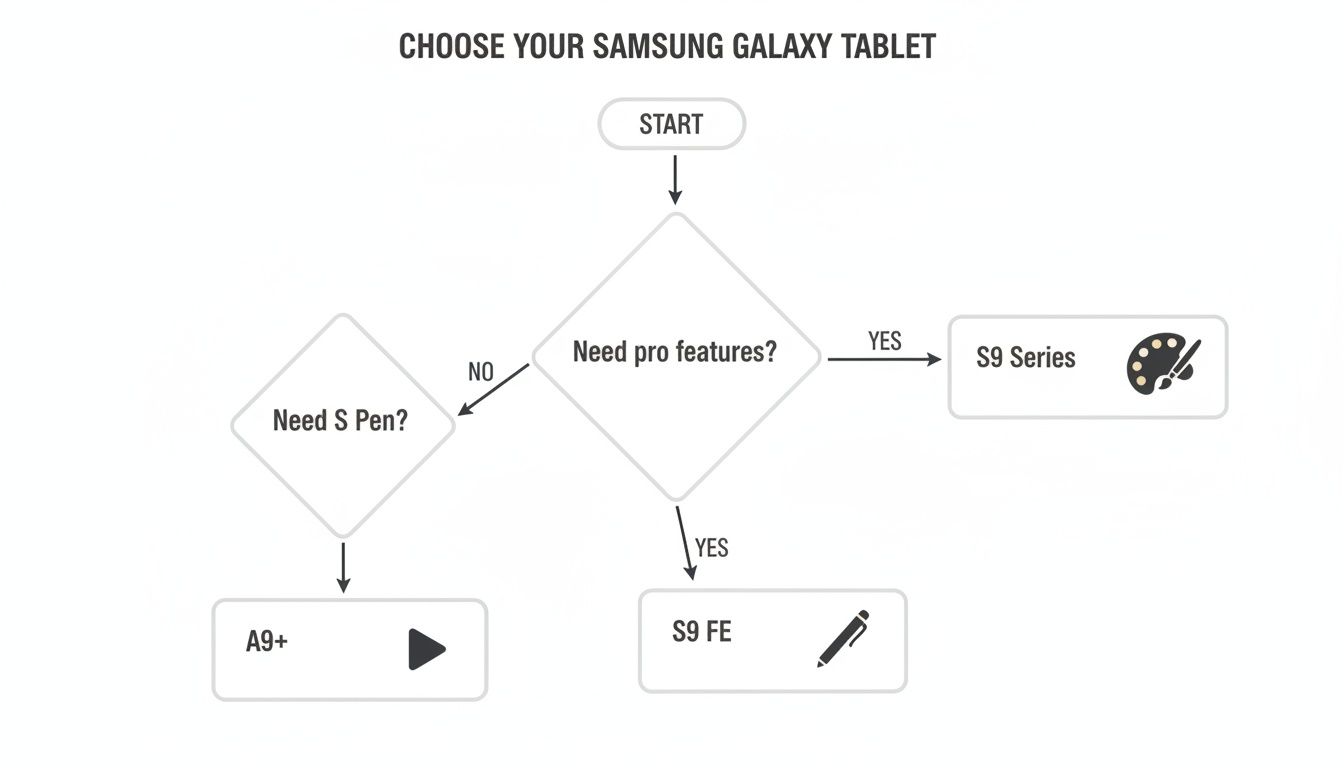
As you can see, the choice boils down to two key questions: do you need pro-level power, and is the S Pen a must-have for your work?
The Digital Artist And Power User
If your day involves digital illustration, editing 4K video, or juggling a dozen apps at once, the Galaxy Tab S9 series is your only real option. For you, that gorgeous Dynamic AMOLED 2X display isn't a luxury—it's essential for getting professional-grade color accuracy. Every single brushstroke appears instantly, thanks to the S Pen's ultra-low latency, which makes the whole creative process feel incredibly fluid.
This user needs a machine that runs demanding apps like Clip Studio Paint or Adobe Lightroom without a single stutter. The flagship Snapdragon processor inside ensures performance is never the bottleneck, letting you focus completely on your craft. It’s a serious investment in a tool that can actually keep up with your ambition.
The Student And Mobile Professional
For students trying to balance lecture notes, research papers, and group presentations—or professionals who need a workstation they can throw in a bag—the Galaxy Tab S9 FE strikes a perfect balance. It gives you the core productivity features that matter most, like the included S Pen for marking up PDFs and a solid Samsung DeX experience for a desktop-like setup, all at a much more wallet-friendly price.
You can go from handwriting notes in a lecture hall to typing out an essay with an optional keyboard case without missing a beat. The 90Hz display keeps everything looking smooth, and its IP68 rating gives you some much-needed peace of mind when carrying it across campus or to a client meeting at a coffee shop. It's the smart, versatile choice for getting real work done without breaking the bank.
The Tab S9 FE is the quintessential "value champion." It brings the premium Samsung tablet experience to a wider audience, making top-tier productivity tools accessible to people who need reliability and function above all else.
The Family And Casual Streamer
If your tablet’s main job is to keep the family entertained, stream movies on the couch, or handle daily tasks like web browsing and social media, the Galaxy Tab A9+ is an incredible choice. It skips the premium creative tools like the S Pen and instead focuses on delivering a fantastic media experience.
Its big, 90Hz screen is perfect for binging Netflix or watching YouTube, and the quad-speaker setup provides surprisingly immersive sound. It has more than enough power for light gaming and educational apps for the kids, making it a versatile hub for the whole household. It’s a reliable, no-fuss device that absolutely nails the basics. And for those curious about its other capabilities, our guide explores if tablets are capable of making phone calls. This makes the A9+ a fantastic, affordable entry point into the Samsung ecosystem.
How To Maximize Your Tablet Experience
Once you’ve picked the right Samsung Galaxy tablet, the real fun begins. The next step is turning it from a great device into a tool you can't live without. The right accessories are what unlock its true potential, improving everything from your productivity to its chances of surviving a drop.
Setting up your tablet with the right gear from day one ensures you get the most out of your investment.
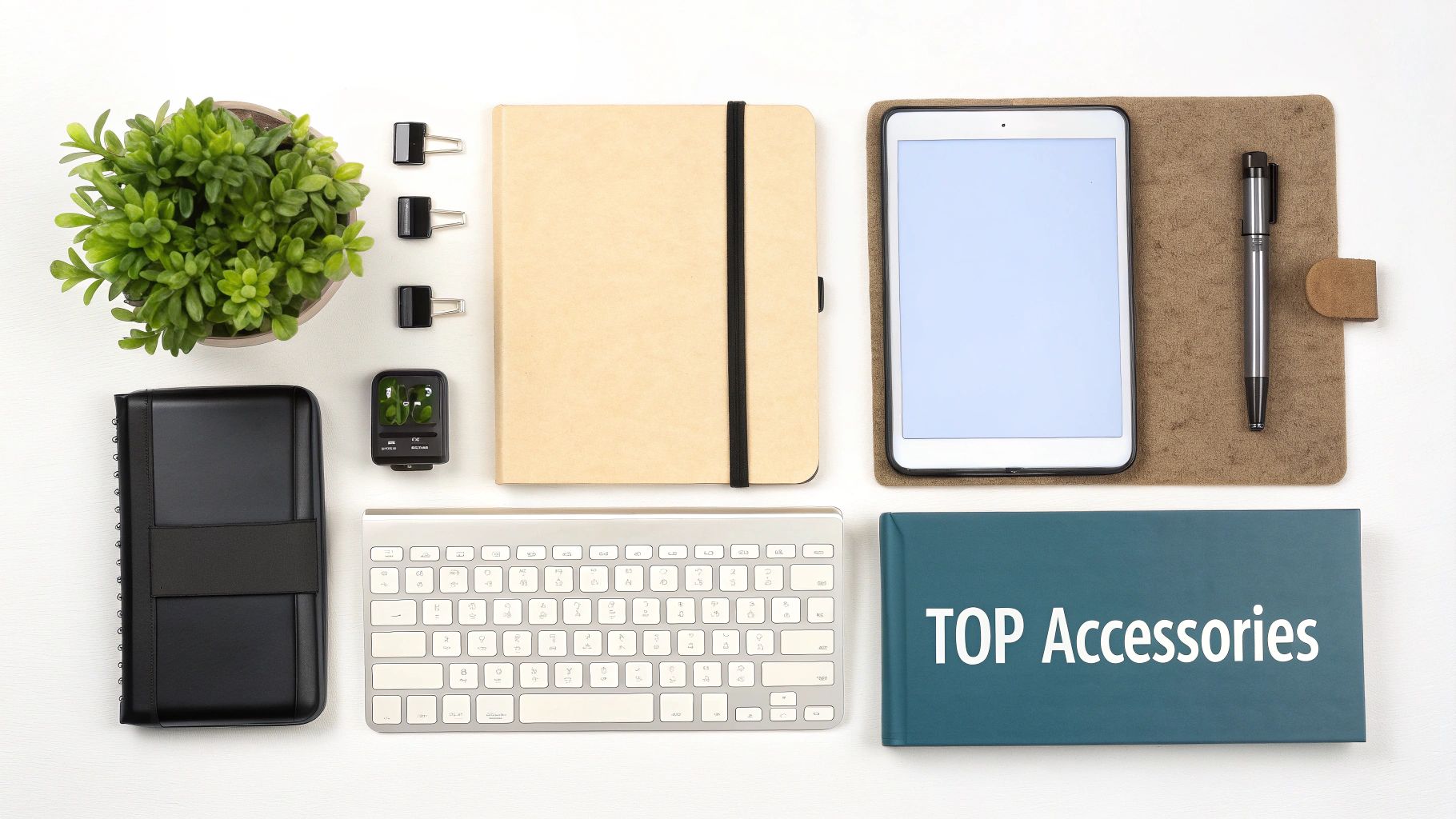
A quality case is non-negotiable, but the kind of case you need depends entirely on how you live and work. A heavy-duty, rugged case brings serious peace of mind if your tablet is used for fieldwork or shared with family—where accidents are a matter of when, not if.
For students and professionals, however, a slim keyboard cover is a total game-changer. It instantly transforms your tablet into a portable workstation, perfectly suited for unleashing the power of Samsung DeX.
Powering Your Productivity
Charging might seem like a boring topic, but it has a massive impact on your daily workflow. A simple upgrade to your charging setup can slash downtime and keep you ready for anything.
Here are a couple of power-boosting accessories to consider:
- 45W Super Fast Charger: If you're a power user with a Tab S9 or S9 FE, this is a must-have. It cuts charging time down significantly, getting your tablet topped up and back in your hands much faster than the charger in the box.
- Multi-Device Charging Station: Anyone deep in the Samsung ecosystem—with a phone, watch, and earbuds—needs one of these. It clears the clutter from your desk and simplifies your routine, letting you juice up everything from a single outlet overnight.
A smart accessory strategy isn't about buying every gadget you see. It's about finding the add-ons that solve your biggest headaches. A faster charger buys you time, while the right case prevents costly repairs and adds real functionality.
Essential Add-Ons For A Complete Setup
Beyond cases and chargers, a few other accessories can round out your experience. A keyboard, for example, is truly transformative for anyone who types more than a few sentences a day. You can learn more about the flexibility of folding bluetooth keyboards, which give you a compact way to stay productive on the go. They’re the perfect partner for Samsung DeX, creating a surprisingly capable laptop replacement for meetings or travel.
Once you’ve got your Samsung Galaxy tablet, mastering its core functions is just as important as the hardware. Knowing how to screenshot on an Android tablet, for instance, is a simple skill that makes saving important info a breeze.
By carefully picking these key accessories, you’ll create a setup that isn’t just protected—it’s perfectly adapted to your daily grind.
Making The Final Decision On Value
When you're comparing Samsung's tablets, the final decision usually boils down to value. But value isn't just about the price you pay today—it's about what you're getting for your money over the long haul. Each of these tablets is aimed at a different definition of "good value," making sure you end up with a smart investment for your specific needs.
The Galaxy Tab S9 is the premium workhorse. Yes, the upfront cost is higher, but that investment buys you future-proof performance. Its flagship processor and stunning AMOLED display mean it won’t feel sluggish or look dated in a couple of years. It’s a sound choice for power users who depend on their tablet every single day.
Finding The Sweet Spot
On the other hand, the Galaxy Tab S9 FE has quickly become the clear value champion of the lineup. It delivers the core premium experience—including must-haves like the S Pen and DeX capabilities—but at a price that's much easier to justify. For students and many professionals, it has all the tools you actually need without the added cost of top-tier processing power you might never touch.
And then there's the Galaxy Tab A9+. Think of it as the smartest, most affordable way into Samsung's excellent ecosystem. It's the perfect fit for anyone needing a reliable device for media, browsing, and light tasks, offering a surprisingly smooth 90Hz display and solid performance without any costly frills.
The right choice really comes down to what "value" means to you. Is it raw power and longevity? A balanced mix of features and price? Or an affordable, dependable entry point into a great ecosystem?
This tiered approach is exactly why Samsung continues to dominate the Android tablet space. The global tablet market is projected to grow from $65.55 billion in 2024 to a staggering $166.46 billion by 2033, and Samsung is perfectly positioned to capture users at every price point. This comprehensive tablet market report shows just how massive that opportunity is. Choosing any of these devices means you’re investing in a brand with a proven track record and a commanding presence in the market.
Burning Questions About Samsung Tablets
Let's wrap this up by tackling a few of the most common questions people have when they're trying to pick the right Samsung tablet. These are the practical, real-world concerns that go beyond a simple spec sheet.
Can I Use The S Pen Across Different Models?
This is a huge point of confusion, and the answer is a firm no. The S Pen that comes with the Galaxy Tab S9 FE is specifically calibrated for that screen. You can't swap it with the pro-grade S Pen from the flagship Tab S9 and expect the same flawless performance. The latency and pressure sensitivity just won't be right.
And it’s crucial to remember: the Tab A9+ doesn't support the S Pen at all. Don't buy one expecting to take notes on it.
Is Samsung DeX Available On All Tablets?
Samsung DeX is a game-changer for productivity, giving you a desktop-like interface on your tablet. But it's not available on every model.
You’ll find DeX on both the premium Galaxy Tab S9 and the mid-range Tab S9 FE series, which is what makes them such great tools for multitasking. If you plan to connect to an external monitor and get serious work done, these are the models you want.
The budget-friendly Galaxy Tab A9+ does not support DeX. This really cements its position as a device for media consumption and casual browsing, not a laptop replacement.
Choosing the right storage is less about the number and more about your habits. A 64GB tablet is fine for streaming, but if you download movies or handle large files, 128GB is the safer minimum.
How Much Storage Do I Actually Need?
Your daily habits are the best guide here. If you mostly stream Netflix, browse the web, and use cloud apps like Google Docs, the 64GB on the Tab A9+ will probably feel fine.
But if you're a student downloading lecture videos or a professional who needs project files offline, 128GB should be your absolute baseline. For anyone else—gamers, video editors, or people who load up on movies for flights—spring for 256GB or more. You'll thank yourself later when you're not constantly fighting for space.
Protecting your new tablet is the final, crucial step. At FoldifyCase, we offer a curated selection of durable cases and essential accessories designed to keep your device safe and enhance its functionality. Explore our collection at https://www.foldifycase.com to find the perfect gear for your new Samsung Galaxy tablet.